Webhooks Setup Guide
Overview
Webhooks let eFICA notify your system in real time when key events occur — for example, when an application status changes or a document is uploaded.
This guide covers:
- Planning and implementing a receiver endpoint
- Verifying payload authenticity (HMAC-SHA256)
- Registering a subscription in eFICA
- Managing subscriptions and rotating secrets
- Handling retries and duplicate deliveries
Step 1 — Plan your endpoint
Your endpoint must be a publicly reachable HTTPS URL that your system controls, for example:
https://api.yourcompany.com/efica/webhooks
It must:
- Accept
POSTrequests with aContent-Type: application/jsonbody - Respond with a
2xxstatus within 10 seconds - Return the same
2xxfor duplicates (idempotent processing)
Recommended pattern: acknowledge immediately with
200 OK, then process the payload asynchronously via a queue or background job. This keeps your response time well within the timeout and avoids failed deliveries caused by slow downstream processing.
Step 2 — Implement the receiver
A minimal receiver should:
- Verify the signature before touching the payload (see Step 3)
- Deduplicate using
X-Efica-Event-Idas an idempotency key - Enqueue the payload for background processing
- Return
200 OKimmediately
If signature verification fails, return 401 and discard the request.
Step 3 — Verify the signature
Every delivery is signed with HMAC-SHA256 using your webhook secret. Always verify before processing.
Request headers
| Header | Description |
|---|---|
X-Efica-Signature | t=<unixSeconds>,v1=<hexHmac> |
X-Efica-Event-Id | Unique identifier for this event |
X-Efica-Event-Type | The event type string, e.g. entity.updated |
User-Agent | efica-webhooks/2.0 |
Verification steps
- Split
X-Efica-Signatureon,to extracttandv1. - Reject if
tdiffers from current Unix time by more than 300 seconds — this prevents replay attacks. - Construct the signed string using the raw request body exactly as received:
signedPayload = "<t>.<rawBody>"
- Compute
HMAC-SHA256(secret, signedPayload)and hex-encode it. - Compare your result to
v1using a constant-time comparison.
Do not parse and re-serialise the JSON body before verifying — any whitespace difference will cause the check to fail. Always use the raw body bytes.
Example — Node.js
const crypto = require('crypto');

function verifyWebhook(secret, rawBody, signatureHeader) {
  const [tPart, v1Part] = signatureHeader.split(',');
  const t = tPart.replace('t=', '');
  const v1 = v1Part.replace('v1=', '');

  const ageSeconds = Math.abs(Date.now() / 1000 - Number(t));
  if (ageSeconds > 300) {
    throw new Error('Timestamp too old — possible replay attack');
  }

  const expected = crypto
    .createHmac('sha256', secret)
    .update(`${t}.${rawBody}`)
    .digest('hex');

  const valid = crypto.timingSafeEqual(
    Buffer.from(expected, 'hex'),
    Buffer.from(v1, 'hex')
  );

  if (!valid) throw new Error('Invalid signature');
}
Step 4 — Choose your event subscriptions
Subscribe only to the events your system needs to act on.
Individual
| Event | Fires when |
|---|---|
individual.created | A new FICA individual record is created |
individual.updated | Any field on an individual record is updated |
Entity
| Event | Fires when |
|---|---|
entity.created | A new FICA entity record is created |
entity.updated | Any field on an entity record is updated |
entity.document.created | A document is uploaded to an entity application |
entity.document.deleted | A document is removed from an entity application |
entity.trust.created | A trust is added to an entity organigram |
entity.trust.updated | A trust record on an entity organigram is updated |
UBO
| Event | Fires when |
|---|---|
ubo.created | A UBO (director, member, etc.) is added to an entity application |
ubo.updated | A UBO record is updated |
ubo.document.created | A document is uploaded for a UBO |
ubo.document.deleted | A document is removed for a UBO |
Step 5 — Register the subscription in eFICA
Step 1 — Open webhook settings
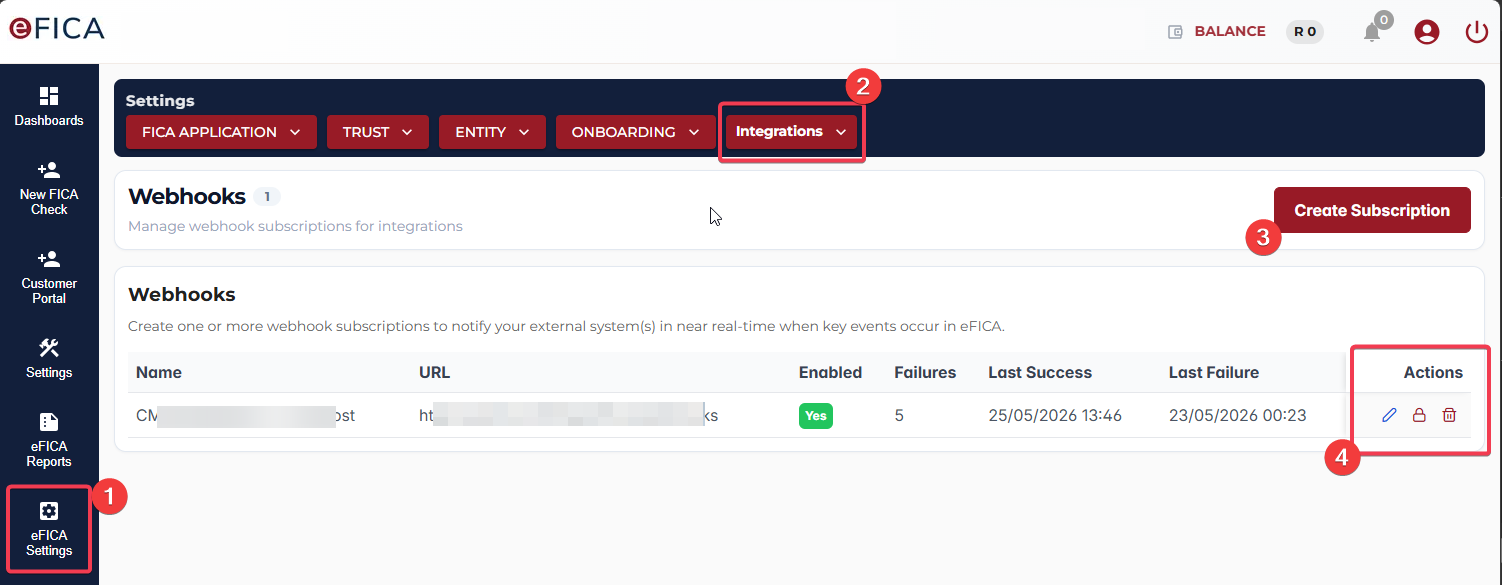
- Click on
eFICA Settingsmenu option. - Open the
Integrationsdropdown menu and selectWebhooks. - Create a new subscription
- Edit, rotate secrets and delete existing webhooks.
Step 2 — Create a subscription
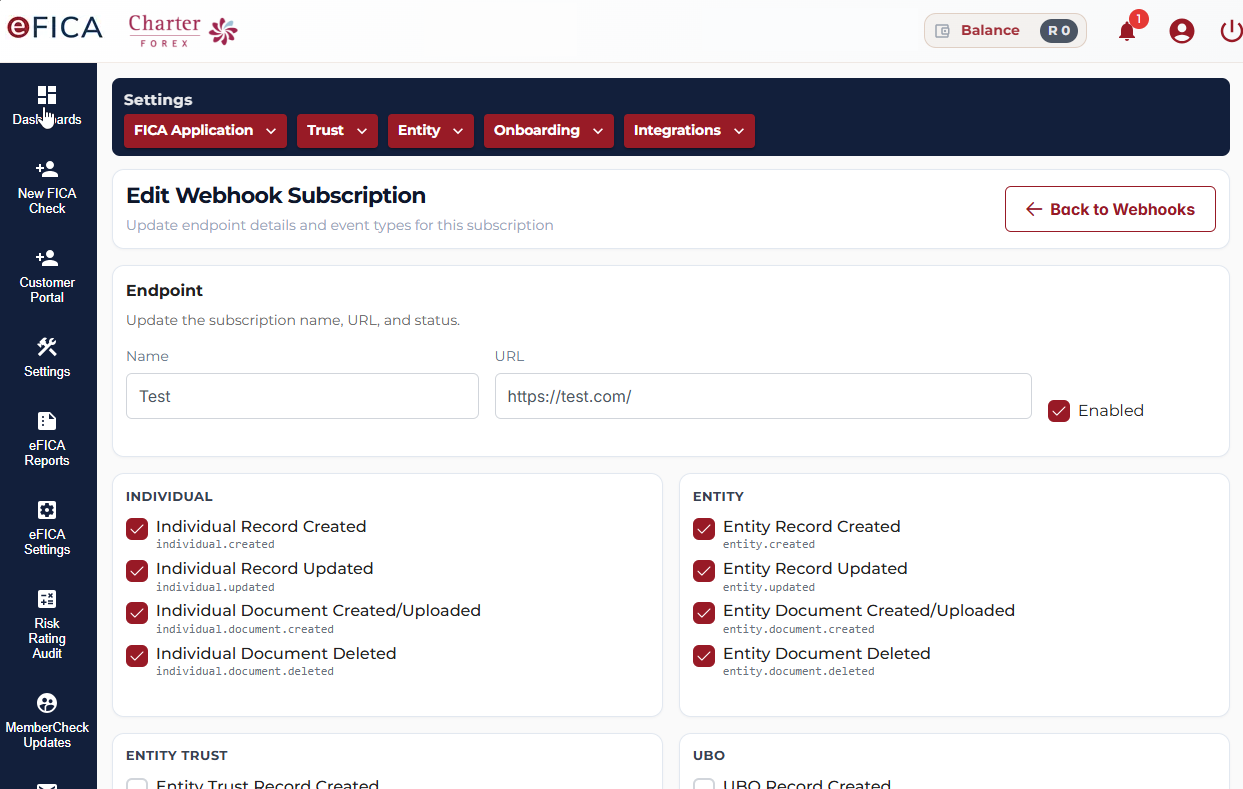
Enter your endpoint URL, give the subscription a name, and select the event types you want to receive.
Step 3 — Save your secret
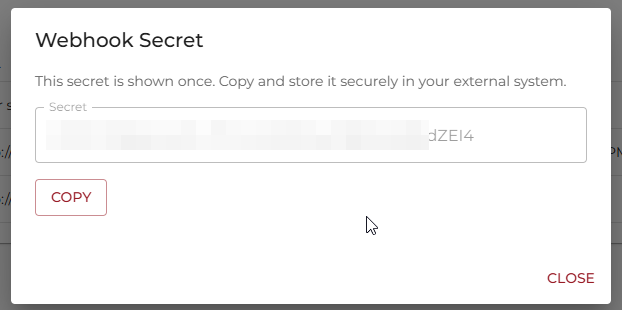
Your webhook secret is shown once only. Copy it immediately and store it securely — for example, as an environment variable or in your secrets manager. It cannot be retrieved again; if lost, you must rotate it.
Managing subscriptions
Once registered, each subscription can be managed from the webhooks dashboard:
| Action | Description |
|---|---|
| Edit | Update the subscription name, endpoint URL, or selected event types |
| Rotate secret | Generate a new signing secret — all deliveries signed with the previous secret will immediately fail verification |
| Delete | Permanently removes the subscription and stops all deliveries — this cannot be undone |
Before rotating a secret: update your receiver to use the new secret first, then rotate. Rotating before updating will cause delivery failures until your receiver is updated.
Retries and delivery guarantees
eFICA will retry delivery on any non-2xx response, connection timeout, or 5xx error.
| Attempt | Delay |
|---|---|
| 1 | Immediate |
| 2 | 1 minute |
| 3 | 5 minutes |
| 4 | 15 minutes |
| 5 | 60 minutes |
| 6 | 6 hours |
| 7 | 24 hours |
After 7 attempts the delivery is marked failed-final. Failed deliveries can be
manually replayed from the eFICA dashboard.
Delivery is at-least-once — the same event may be delivered more than once during
retries or manual replays. Always deduplicate on X-Efica-Event-Id.
Troubleshooting
| Symptom | What to check |
|---|---|
| No webhook received | Endpoint is publicly reachable over HTTPS; firewall allows inbound POST; TLS certificate is valid |
| Signature verification fails | Raw request body is being used (not re-serialised); correct secret is configured; timestamp skew is within 5 minutes |
| Unexpected retries | Endpoint is returning 2xx within 10 seconds; processing is not blocking the response |
| Duplicate events | Deduplication logic is keying on X-Efica-Event-Id |
| Secret lost | Rotate the secret from the webhooks dashboard and update your receiver |
Document history
| Version | Date | Notes |
|---|---|---|
| 1.0 | 2026-05-26 | Initial release |
Support
For technical support and questions:
- Email: melissa@efica.co.za
- Melissa will co-ordinate with the development team.
This documentation is maintained by the eFICA development team. For updates and corrections, please contact your account manager.
Last Updated: 26 May 2026